Cart and free shipping
Tambour has three cart types: a drawer, a notification and the cart page. You pick one in Theme settings > Cart with Cart type. The cart page at your store’s /cart address is there with every type.
Choose what happens on Add to cart
Section titled “Choose what happens on Add to cart”- Drawer, the default, opens the cart drawer from the right side of the screen. The new line is outlined until the next add. The cart link in the header opens the drawer too.
- Notification shows a small panel with “Added to your cart”, the added product, the subtotal, a “View cart” button and a “Checkout” button. The panel stays until the shopper closes it, so they can keep shopping. The cart link in the header goes to the cart page.
- Page takes the shopper to the cart page each time they add a product.
The drawer and the notification add the product without leaving the page the shopper is on.
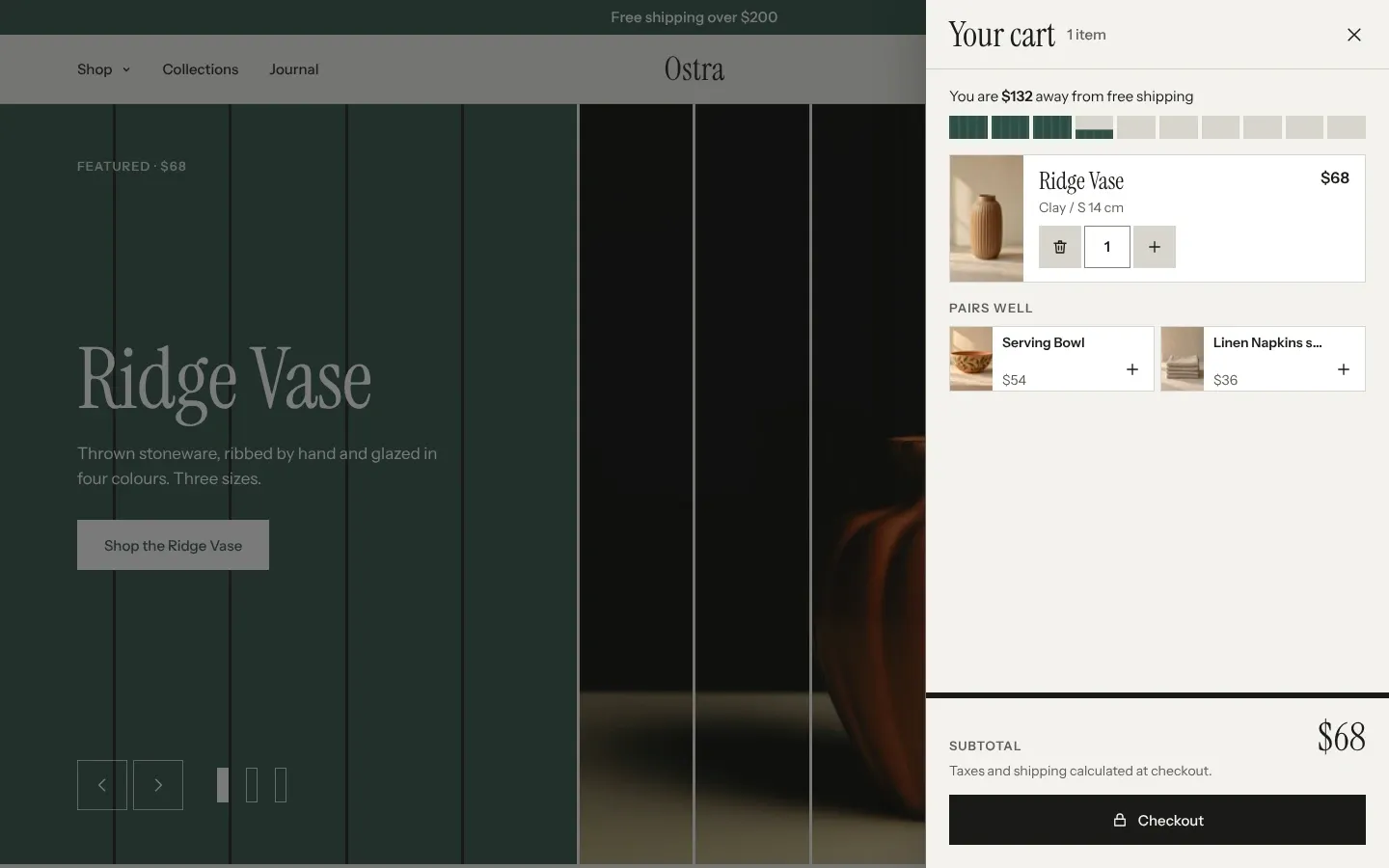
Besides the lines, the drawer shows the free shipping slats, up to two “Pairs well” products the shopper can add with one click, order discounts, the subtotal, a line about taxes and shipping, and “Checkout”. The pairs come from Shopify’s product recommendations for the newest line, and leave out products already in the cart.
Set the free shipping threshold
Section titled “Set the free shipping threshold”The free shipping slats are ten upright bars over the cart. Each slat stands for a tenth of your threshold, and fills as the cart total grows. With a $200 threshold and $68 in the cart, three slats are full and the fourth is 40% full. The line above them reads “You are $132 away from free shipping”. On an empty cart it reads “Free shipping on orders over $200”. Once the total reaches the threshold, the slats close into one bar and the line reads “Free shipping unlocked on this order”.
- Open Theme settings > Cart.
- Enter Free shipping threshold in your store’s currency, without the currency sign. The default is 200.
- Click Save.
Shoppers paying in another currency see the threshold converted at Shopify’s exchange rate. Set the threshold to 0 to hide the slats. They show in the drawer, the notification and on the cart page.
The threshold only draws the slats. It doesn’t make shipping free. Create a free shipping rate with the same minimum order price in Shopify, under Settings > Shipping and delivery. Shopify explains shipping rates.
Show express checkout in the drawer
Section titled “Show express checkout in the drawer”Turn on Show express checkout in the cart drawer to add Shopify’s express payment buttons, such as Shop Pay, under “Checkout” in the drawer. It is off by default. The cart page always shows them. Which buttons appear depends on the payment methods you have turned on in Shopify. Shopify explains accelerated checkouts.
What the empty cart shows
Section titled “What the empty cart shows”The empty drawer reads “Nothing here yet” and “Start with a collection.”, over a row of up to seven collections as spines, the tallest for the collection with the most products. Under them is a “Continue shopping” button to all your products, and, when customer accounts are on and the shopper isn’t logged in, a line inviting them to log in.
To choose those collections, open the theme editor, select Cart drawer in the sidebar and pick up to seven in Empty cart collections. Left empty, the drawer shows the seven collections with the most products.
The empty cart page reads “Nothing here yet. Start with a collection.” with the same button and log-in line, and always shows your seven largest collections.
The cart page
Section titled “The cart page”The cart page shows “Your cart” with the item count, the free shipping slats, the lines, and an “Order note” box where the shopper can leave a gift message or delivery details. Beside them, the order summary lists order discounts, the subtotal, the tax line, “Checkout” and the express buttons. “Pairs well” products show under the cart. The page has no settings of its own.
On each line, the minus button turns into a bin at quantity 1, which removes the line. Above 1, a “Remove” button sits beside the quantity. When Shopify tracks a variant’s stock and stops selling at 0, the plus button stops at the stock left. Once the line holds all of it, the line reads “Only 3 left”.
Checkout belongs to Shopify, not the theme. Its look, fields and payment options are set in your Shopify admin. Shopify explains checkout settings.
Common questions
Section titled “Common questions”Why doesn’t the drawer open when I add a product?
Section titled “Why doesn’t the drawer open when I add a product?”Cart type is set to Notification or Page. Set it to Drawer in Theme settings > Cart.
Why is the free shipping line missing?
Section titled “Why is the free shipping line missing?”Free shipping threshold is 0.
Shoppers reach the threshold but still pay for shipping. Why?
Section titled “Shoppers reach the threshold but still pay for shipping. Why?”The slats don’t change shipping. Your free shipping rate in Shopify sets what shoppers pay at checkout. Give it the same minimum as the threshold.
Can I add a discount code field to the cart?
Section titled “Can I add a discount code field to the cart?”No. Shoppers enter discount codes at checkout. Discounts already on the order show in the cart.